Example delivery
One real change, from brief to evidence
A bug fix from the WeDo app project, run on Drover. The record below comes from that project’s delivery board and pull request, with nothing added.
- Project
- WeDo app (mobile)
- Ticket
- UI-77, priority P0
- Pull request
- #229, merged 31 July 2026
- Size
- 5 files, 144 lines added, 19 removed
01
The brief
On the sign-up screen, the link “Already have an account? Log in” was meant to switch to the log-in form. It was wired to the log-in button instead.
With empty fields, it showed a misleading “Add an email address to continue” message, so the link looked broken. With sign-up details typed in, it quietly tried to sign in to an account that did not exist yet.
The ticket was explicit that a working sign-in path already existed and must not be rebuilt. The defect was narrower: the link should switch mode and do nothing else.
02
Acceptance criteria
Agreed before the work started. These are the criteria the verifier later checked, in the ticket’s own terms.
- Type checking and linting pass.
- The full test suite shows no new failures against a baseline recorded at the branch point.
- The sign-up footer link switches to log-in mode and does nothing else: it never submits and never triggers sign-up validation.
- With empty fields, tapping it shows no validation message and the heading changes to the log-in heading.
- With sign-up details typed in, tapping it does not attempt a sign-in.
- The mirror case holds: the log-in footer switches to sign-up rather than submitting.
- A test covers the fresh-install path: Welcome, Log in, credentials, Home.
- Regression: the existing Welcome “Log in” route still works and is untouched.
03
The change
Delivered as a pull request. The footer control now only switches mode, and the code that submitted from it was removed.
app/src/app/sign-in.tsx
onPress={!email.trim() || !password ? touchForm : onLogIn} onPress={() => { setError(null); setMode('login'); }} 04
Tests
Chosen for this change: unit tests for the behaviour, and a browser flow that reproduces it the way a person would.
- Switching mode with empty fields shows no validation message.
- With sign-up details typed in, the sign-in call is never made.
- The log-in footer switches to sign-up without signing in.
- The fresh-install path from Welcome through log-in to Home.
- A browser flow (Maestro, on the web build) that opens Welcome, taps Get started, taps the footer link and checks the log-in view appears with no validation message.
05
Separate verification
A verifier session, separate from the one that implemented the change, checked the delivered code. Its result names the revision it assessed: e89842f. All eight steps passed.
| Step | What was checked | Result |
|---|---|---|
| 1 | Type checking and linting | Pass. Both exit cleanly with no diagnostics. |
| 2 | Full test suite against baseline | Pass. Baseline: 100 suites, 970 tests. With the change: 100 suites, 971 tests. No failures. |
| 3 | Browser flow on the web build | Pass. Welcome, Get started, footer link, “Welcome back” shown, sign-up heading gone. |
| 4 | Empty fields | Pass. No validation message after the switch. |
| 5 | Sign-up details typed in | Pass. The sign-in call is not made. |
| 6 | Mirror case | Pass. The log-in footer switches to sign-up without signing in. |
| 7 | Fresh-install path | Pass. Welcome to Home through the log-in route. |
| 8 | Regression | Pass. The Welcome route’s file is identical to the baseline. |
What the record also says
- In one full-suite run on the verifier’s machine, two unrelated tests timed out and the process exited abnormally. The named tests were rerun and passed, then the whole suite was rerun in smaller batches and passed. The record keeps that account.
- The verifier’s session could not upload screenshots to the board. It regenerated them from the committed browser flow and recorded each file’s path and checksum instead. The record states this limitation.
06
The evidence
The two screenshots the browser flow produced: the sign-up screen before the tap, and the log-in view after it.
Evidence from the WeDo project
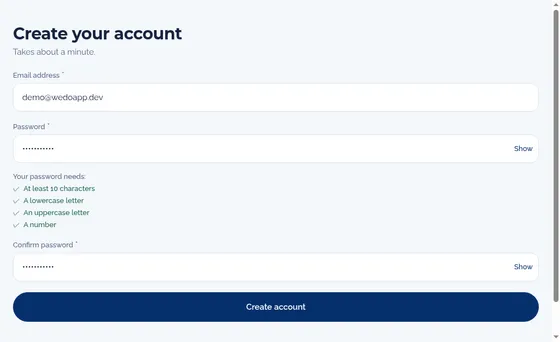
Evidence from the WeDo project
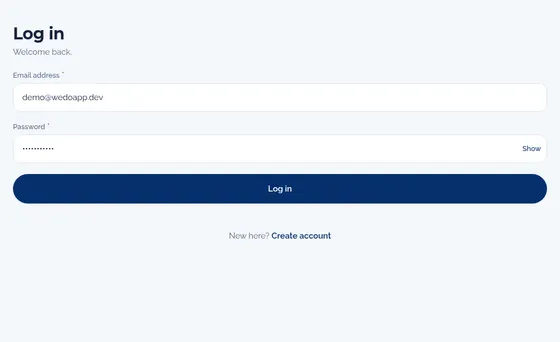
What this example does and does not show
- It shows one small, real change and the evidence kept for it. It is not a benchmark and says nothing about speed or volume.
- Passing verification is not a release. The change was merged by pull request on 31 July 2026; this page makes no claim about deployment or operation.
- The screenshots use demonstration sign-up details created for testing.
Discuss your project
Tell us what you need built, improved or connected. We start with the outcome you want and who signs off on it.